




Today we discus about How to Setup and Use IMO on Windows PC & Laptop. For many, using IMO on a computer is more comfortable than using a smartphone. Especially for those sitting in front of the PC, it is easier to use IMO if it is on the PC. IMO, any call or message is actually time-consuming for some people to pick up the phone and receive the call or read the statement.
IMO is a smartphone app that runs on Android and iOS. Usually, you have to open and verify the IMO account with your mobile number. However, the IMO account can be verified without a mobile number. At the same time, it is good for many if the IMO can be set up on the PC. Then, the call can be received there, or the call can be given to someone else if necessary.
And for them, we have a new tutorial of this video calling app, How to Setup and Use IMO on Windows PC & Laptop.
Advantages of Using IMO on Computer
Many people have to sit in front of the computer all day for work or other reasons. Then it is not possible to see if the message has come to the mobile again and again. So there is a huge advantage for them. You can also use IMO on the computer if you need it.
Because computers have the same benefits as mobiles. So let’s see from below where it can be downloaded and how it can be given up.
IMO Key Features
- Communicate in text chat, create group conversations.
- Voice and video calls (only an interlocutor).
- Minimalistic interface without graphic excesses.
- Automatically import a list of friends from a mobile client.
- Instant data synchronization across all devices using IMO.
- Multimedia file exchange with a source (up to 100 MB).
- A quick search for post history.
- Access the profile settings page.
- Lack of authorization without the presence of a registered and confirmed (from a portable device) account.
- IMO (IMO) is a free, multifunctional application for instant email messaging for smartphones and tablets in Android video calls and phone chats.
2 Easy Ways: How to Setup and Use IMO on Windows PC & Laptop?
If you want to use IMO on mobile and laptop or desktop, follow the steps below. Here I have discussed with you 2 easy ways to set up and use IMO on Windows PC & Laptop. However, before that, make sure that you have IMO on your mobile and an account in it. So let’s start with the IMO setup and download first.
Way No 01: How to Setup and Use IMO on Windows PC & Laptop Using IMO Application.
Download and Setup IMO on Windows PC & Laptop
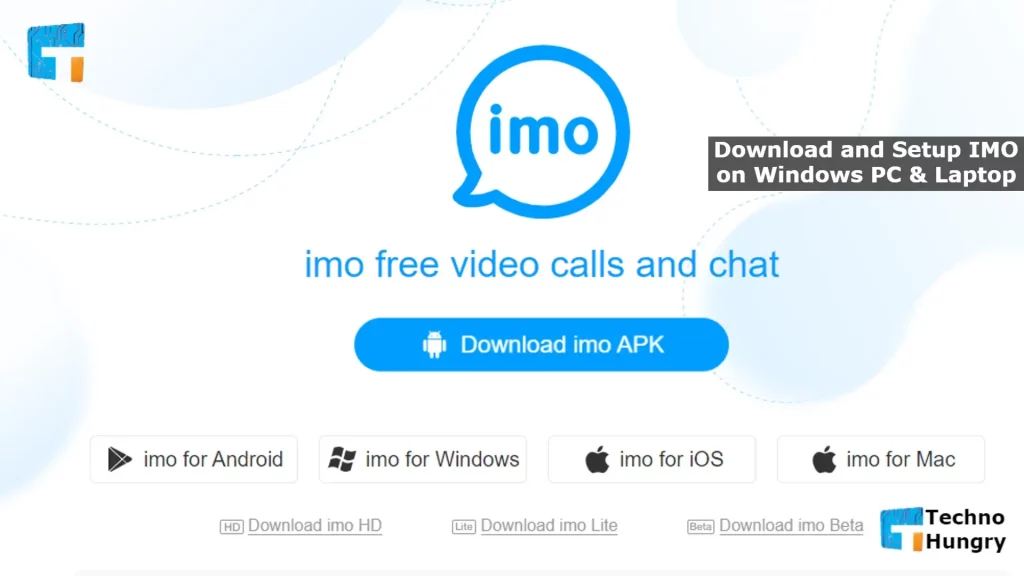
Step 01: IMO Download
- Open Google Chrome or any browser from your computer.
- Now visit the official website of IMO in the browser.
- Below the Download IMO APK button is written IMO for Android, IMO For Windows, IMO for iOS, IMO for Mac. Assuming you are using Windows PC. So, click on IMO for Windows. And if you use Mac, click on IMO for Mac.
- The IMO setup file will be downloaded. Just select the folder you want to download. The way you download and set up software on a computer is the same.
- Now open the setup file. To start the setup, just accept the IMO terms and conditions as per the rules and click on the install button.
- Wait until the installation is complete and when finished, click the Finish button.
Step 02: IMO Setup
- It is better if the IMO app is already running on your computer. If not, turn it on.
- Once turned on, you will get a question whether your mobile has IMO, no. You then click the Yes button.
- Now select your country, that is, the country in which you live. Then give me your number. It must be the number with which you opened the IMO on the mobile.
- Now click on the Continue button.
- Check your mobile. See a message from IMO where a verification code is given.
- A window with entering Your Verification Number has opened. Enter this verification code there and click on the arrow sign on the right. Or press the Enter key from your computer.
Also Read: How to copy text from a picture in OneNote & Mobile?
Way No 02: How to Download and Setup IMO on Windows PC & Laptop via Bluestacks.
The first method is not suitable for users who do not have the opportunity to register in the mobile application via smartphone. So the best option would be to use an Android emulator for Windows. We will look at the example of Bluestacks and show you how to install IMO on it. But, first, you need to follow the instructions below.
- Go to the official Bluestacks website and download the software to your computer.
- The next step is to search for IMO via BlueStacks. In the search bar, enter a name and search for the application.
- Click the “Install” button.
- Accept the permission and wait for the download to complete, then proceed with the registration.
- In some cases, the software does not load through Play Market, so you should install the APK manually. To get started, go to the IMO main page and click the button to download the file there “Download IMO apk now.”
- On the Bluestacks home page, navigate to the tab. My Applications and click “Install APK” in the bottom right of the window. Select the downloaded file and wait until it is added to the program in the window that opens.
- Run IMO to proceed with registration.
- Select a country and enter a phone number.
- Specify the code that the message will come from.
- Now you can set a username and make the app work.
May You Like: How to Swipe on Instagram PC?
Essay, IMO account is set up on your computer. So, you have no more obstacles about How to Setup and Use IMO on Windows PC & Laptop. Now you can use IMO on any computer-like mobile.