





How to Use WhatsApp Web on Computer, Laptop & Tablet? There is a need to use WhatsApp on mobile and computers many times. Whether you need it or not, this messaging app launched 10 years ago is still at the top of popularity. As of 2017, the number of users is 1.6 billion.
With so many users in mind, in May 2016, WhatsApp released an app for computers. They develop free apps for both Windows and macOS operating systems. Even after removing the app, many people do not know the exact rules of using this app. Since the app is not like a mobile app, many people are hesitant to use it.
However, after reading today’s article, you don’t have to worry about using WhatsApp’s popular messaging platform on your computer. You can easily use WhatsApp on your computer by following a few simple steps.
So, if you are looking for a way to use WhatsApp on your computer and want to know all the rules of using it, then today’s article is for you. In today’s article, I will teach you how to use WhatsApp Web on Computer, Laptop, or Tablet.
How to Use WhatsApp Web on Computer, Laptop, or Tablet?
First, if you want to use WhatsApp Web on your computer, you must have the WhatsApp app on your mobile phone. If you do not have the WhatsApp app on your mobile phone, download and install the WhatsApp app and sign in to your WhatsApp account on your mobile phone.
Once you have signed in to your WhatsApp account on your mobile phone, follow the procedure below to use WhatsApp Web on your computer.
- Turn on the computer, and connect to the internet.
- Open any browser of your choice.
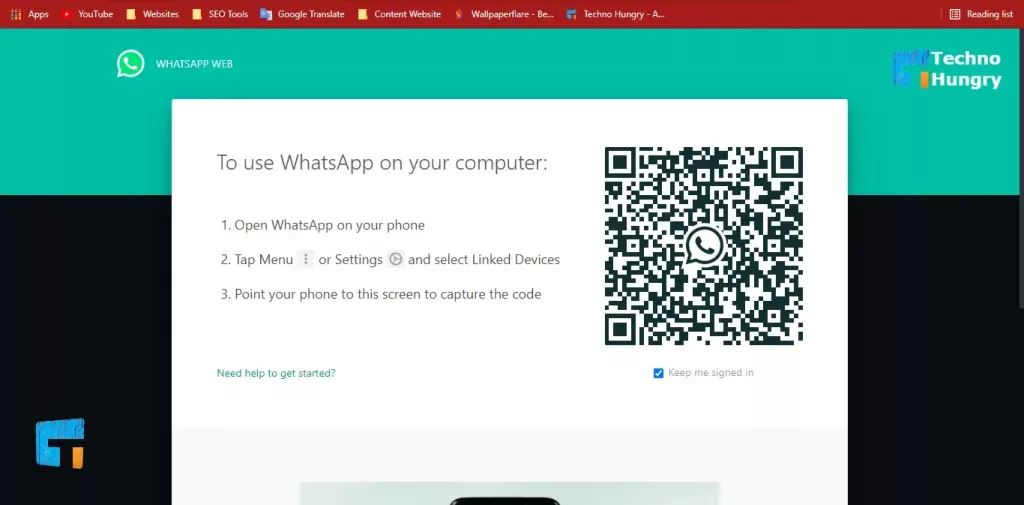
- Enter web.whatsapp.com in the address bar.
- The homepage of the WhatsApp web will come up. You will see a QR Code there.
- Then open WhatsApp on your mobile.
- Go to the Chats tab, and enter the three-dot at the top right.
- You will see a dropdown menu. Select WhatsApp Web from there.
- Click on the link “Device in Device.”
- Then scan the QR Code on your mobile phone on the homepage of WhatsApp Web on your computer.
- When the scan is completed successfully, you will view all the chats on your mobile phone and use WhatsApp from the computer just like a mobile phone.
If you want to log out of the WhatsApp web, go back to the Chats tab:
- Enter the three-dot at the top right.
- Select WhatsApp Web from there. You will see Active text below the browser you have selected.
- Click on that browser and select Log Out from there.
May You Like: 271 WhatsApp New Emojis is Released in 2021 Update
Advantages of Using WhatsApp on a Computer
There are many benefits to using WhatsApp on a computer, which are as follows:
- Many people are not accustomed to typing on the small screen of a mobile phone. They can quickly type/chat using the computer keyboard.
- There is a facility to exchange any file from the computer.
- There is a facility to exchange pictures by adding a webcam. There is no need to add a webcam to the laptop. The laptop has a camera.
Difficulty Using WhatsApp on Computer
There are some disadvantages to using WhatsApp on a computer, which are as follows:
- As it is web-based, it is not possible to see the previous chat on WhatsApp on the computer without an internet connection.
- There is no facility to invite anyone from the address book.
- There is no map location sharing facility.
Also Read: How to Turn on Disappearing Messages on WhatsApp?
How do you like my article today about How to Use WhatsApp Web on Computer, Laptop & Tablet? You can let me know by commenting. If you want to read other technology articles, come to our website. If you like the article, don’t forget to share.